Segment Routing 是一种基于源路由(转发路径由流量的源节点预定义)范式的路由技术,其通过在源节点上将称为 Segment 的指令的列表嵌入至数据包中,以此定义数据包的转发路径。
为何选择 Segment Routing
相较其它路由技术,Segment Routing 具有以下优势:
- 简便:无需额外的信令协议(LDP,RSVP-TE),SR 路由信息可通过具有相关拓展功能的链路状态协议(IS-IS,OSPF)传播。
- 可拓展性:由于中间节点无需维护路径的状态,只需根据数据包中定义的 Segment 列表执行对应指令,中间节点的资源可得到更大节约。
- 支持流量工程:Segment Routing 基于源路由范式,可根据具体的需要对转发路径进行编程。
- 消除 BGP 黑洞:引入内部的第二数据平面(MPLS/SRv6),将数以万计的 BGP 路由映射到数条第二数据平面的路由上,使不运行 BGP 的中间节点能够正常转发网际流量,节约资源。
以下是一些主流路由技术的对比:
| 名称 | 简便 | 可拓展性 | 支持流量工程 | 消除 BGP 黑洞 |
|---|---|---|---|---|
| 纯 IPv4/IPv6 | 是 | 中 | 否 | 否 |
| MPLS 和 LDP | 否 | 中 | 否 | 是 |
| MPLS 和 RSVP-TE | 否 | 低 | 是 | 是 |
| Segment Routing | 是 | 高 | 是 | 是 |
为何选择 SRv6
主要原因:这篇文章讲的就是 SRv6。
Segment Routing 可直接运行在 MPLS(SR-MPLS)和 IPv6(SRv6)数据平面之上。
Segment Routing over MPLS(SR-MPLS)是一种工作在 MPLS 数据平面之上的 Segment Routing 技术,其通过将 Segment 列表以标签栈的形式编入 MPLS 数据包实现 Segment Routing,无需对 MPLS 协议栈本身做出任何修改。
Segment Routing over IPv6(SRv6)是一种工作在 IPv6 数据平面之上的 Segment Routing 技术,其通过为 IPv6 的 Routing Header 引入新类型:SR Header(SRH)使之具备 Segment Routing 能力。
相较 SR-MPLS,SRv6 是一位更常被提起的“明日之子”,:
- 更好的兼容性:SRv6 可在现网不全域实施 Segment Routing 的情况下在边缘节点上实施,可以循序渐进地实施,中间节点会将 SRv6 数据包视为普通的 IPv6 数据包传输,而 SR-MPLS 的改造需要整个网域的配合。
- 更高的流行度:SRv6 更常被大家提到,而 Linux 更是将其集成为网络协议栈的一部分,且无需额外加载内核模块;SR-MPLS 依赖 MPLS,需要额外加载内核模块,这对于使用 LXC 技术的节点是几乎不可能的。
- 更大的寻址空间:SRv6 基于 IPv6,单个 SRv6 Locator 最小可为一个 /64 大小的网络,其可提供 2^64 个 IPv6 地址以供 SR 网络功能使用,而 SR-MPLS 使用的 MPLS 最多支持 2^20 的寻址空间,其数量略小于全球 IPv4 路由表的规模(当前全球 IPv4 路由表的路由条目数量在一百万条以上),可拓展性相对有限。
目录
1 准备工作
本文对读者有前置知识要求:
- 基础的 Linux 知识
- 具备 DN42 网络建设和运营的知识,已读通 DN42 Wiki 的 Getting Started 和 Universal Network Requirements
- 未有搭建大规模的 DN42 网络,或具有推翻重来的巨大魄力
本文中出现的所有节点均是以下配置:
- 运行 Debian
- 使用 GRE over Wireguard 进行节点间互联
- 运行 FRR 路由套件
- 使用 IS-IS 作为 IGP
- 使用 DN42-GT 和 THIS-AS VRF
- 使用 DN42-GT 与其它网络互联
- 将本网路由放在 THIS-AS VRF 中发布
本文所展示的 DN42 over SRv6 L3VPN 部署是在我的真实 DN42 网络基础设施上进行的。
1.1 安装 FRR
目前,想要在 Linux 上实施 SRv6,FRR 是最方便的选择,而且我的基础设施也一直运行着 FRR。
不同的发行版安装各有不同,我的节点大多运行基于 Debian 的发行版,可通过 https://deb.frrouting.org 寻得对应版本的下载方式。
如若您同我一样使用 Debian,不要忘记安装 frr-rpki-rtrlib,它是 FRR 运行 RPKI 协议的依赖,ROA 过滤是 DN42 网络的必选项。
FRR DN42 配置的常规部分可参阅 FRRouting。
1.2 修改内核参数
在 Universal Network Requirements 的基础上,添加:
net.ipv6.seg6_flowlabel=1
net.ipv6.conf.all.seg6_enabled=1
net.vrf.strict_mode=1
注意:net.vrf.strict_mode 是一项关键参数,它决定了不同的 VRF 是否能够共享同一张路由表,当其值为 1 时,每个 VRF 都必须使用独立的路由表。 若其值不为 1,则 SRv6 IPv4 L3VPN 将无法正常工作,相关的 SID 路由将被拒绝。
1.3 配置网络接口和 VRF
net.vrf.strict_mode 会在每次 VRF 添加后重置为 0,为了避免网络运作的中断,请尽可能预先创建好所有需要用到的 VRF。
以下所有指令都不是持久化的,使用何种持久化方案取决于您的选择。
以下是使用 iproute2 创建 DN42-GT 和 THIS-AS VRF 的命令:
ip link add DN42-GT type vrf table 300
ip link add THIS-AS type vrf table 100
ip link set DN42-GT up
ip link set THIS-AS up
IS-IS 需要一个 dummy 接口用于指向 SRv6 Locator 路由(默认名称为 sr0):
ip link add sr0 type dummy
ip link set sr0 up mtu 65536
IS-IS 需要工作在可承载以太网帧(gretap,l2tpv3)或支持 OSI 封装(gre)的隧道上,所以透过 Wireguard 的 IPv4 地址创建 GRE 隧道:
ip link add azj1 type gre local 169.254.24.3 remote 169.254.24.17 nopmtudisc
sysctl -w net.ipv6.conf.azj1.seg6_enabled=1
由于未知的原因,FRR 无法使用 ip6gre 隧道承载 IS-IS 流量,ip6gre 似乎不支持 OSI 封装,所以请不要使用 IPv6 建立 GRE 隧道(但是 ip6gretap 承载的是以太网帧,所以可以)。
2 FRR 配置
在每一个网络节点上进行以下配置,本文以我的 CAN1 节点配置为例。
IP 和 SRv6 Locator 分配:
- SRv6 Locator:5f00:3947:3::/48
- lo:
- fdfa:7906:8262:ffff::3/128,用于 BGP L3VPN 会话建立
- 5f00:3947:3::1/128,作为 SRv6 源地址使用
2.1 daemons 配置
启用 BGP 和 IS-IS,并启用 RPKI 支持。
# This file tells the frr package which daemons to start.
#
# Sample configurations for these daemons can be found in
# /usr/share/doc/frr/examples/.
#
# ATTENTION:
#
# When activating a daemon for the first time, a config file, even if it is
# empty, has to be present *and* be owned by the user and group "frr", else
# the daemon will not be started by /etc/init.d/frr. The permissions should
# be u=rw,g=r,o=.
# When using "vtysh" such a config file is also needed. It should be owned by
# group "frrvty" and set to ug=rw,o= though. Check /etc/pam.d/frr, too.
#
# The watchfrr, zebra and staticd daemons are always started.
#
bgpd=yes
ospfd=no
ospf6d=no
ripd=no
ripngd=no
isisd=yes
pimd=no
pim6d=no
ldpd=no
nhrpd=no
eigrpd=no
babeld=no
sharpd=no
pbrd=yes
bfdd=yes
fabricd=no
vrrpd=no
pathd=yes

#
# If this option is set the /etc/init.d/frr script automatically loads
# the config via "vtysh -b" when the servers are started.
# Check /etc/pam.d/frr if you intend to use "vtysh"!
#
vtysh_enable=yes
zebra_options="  -A 127.0.0.1 -s 90000000"
mgmtd_options="  -A 127.0.0.1"
bgpd_options="   -A 127.0.0.1 -M rpki"
ospfd_options="  -A 127.0.0.1"
ospf6d_options=" -A ::1"
ripd_options="   -A 127.0.0.1"
ripngd_options=" -A ::1"
isisd_options="  -A 127.0.0.1"
pimd_options="   -A 127.0.0.1"
pim6d_options="  -A ::1"
ldpd_options="   -A 127.0.0.1"
nhrpd_options="  -A 127.0.0.1"
eigrpd_options=" -A 127.0.0.1"
babeld_options=" -A 127.0.0.1"
sharpd_options=" -A 127.0.0.1"
pbrd_options="   -A 127.0.0.1"
staticd_options="-A 127.0.0.1"
bfdd_options="   -A 127.0.0.1"
fabricd_options="-A 127.0.0.1"
vrrpd_options="  -A 127.0.0.1"
pathd_options="  -A 127.0.0.1"


# If you want to pass a common option to all daemons, you can use the
# "frr_global_options" variable.
#
#frr_global_options=""


# The list of daemons to watch is automatically generated by the init script.
# This variable can be used to pass options to watchfrr that will be passed
# prior to the daemon list.
#
# To make watchfrr create/join the specified netns, add the the "--netns"
# option here. It will only have an effect in /etc/frr/<somename>/daemons, and
# you need to start FRR with "/usr/lib/frr/frrinit.sh start <somename>".
#
#watchfrr_options=""


# configuration profile
#
#frr_profile="traditional"
#frr_profile="datacenter"


# This is the maximum number of FD's that will be available.  Upon startup this
# is read by the control files and ulimit is called.  Uncomment and use a
# reasonable value for your setup if you are expecting a large number of peers
# in say BGP.
#
#MAX_FDS=1024

# Uncomment this option if you want to run FRR as a non-root user. Note that
# you should know what you are doing since most of the daemons need root
# to work. This could be useful if you want to run FRR in a container
# for instance.
# FRR_NO_ROOT="yes"

# For any daemon, you can specify a "wrap" command to start instead of starting
# the daemon directly. This will simply be prepended to the daemon invocation.
# These variables have the form daemon_wrap, where 'daemon' is the name of the
# daemon (the same pattern as the daemon_options variables).
#
# Note that when daemons are started, they are told to daemonize with the `-d`
# option. This has several implications. For one, the init script expects that
# when it invokes a daemon, the invocation returns immediately. If you add a
# wrap command here, it must comply with this expectation and daemonize as
# well, or the init script will never return. Furthermore, because daemons are
# themselves daemonized with -d, you must ensure that your wrapper command is
# capable of following child processes after a fork() if you need it to do so.
#
# If your desired wrapper does not support daemonization, you can wrap it with
# a utility program that daemonizes programs, such as 'daemonize'. An example
# of this might look like:
#
# bgpd_wrap="/usr/bin/daemonize /usr/bin/mywrapper"
#
# This is particularly useful for programs which record processes but lack
# daemonization options, such as perf and rr.
#
# If you wish to wrap all daemons in the same way, you may set the "all_wrap"
# variable.
#
#all_wrap=""
2.2 配置接口 IP 地址
编辑 /etc/frr/frr.conf,添加以下配置:
lo:
!
interface lo
 ipv6 address 5f00:3947:3::1/128
 ipv6 address fdfa:7906:8262:ffff::3/128
 ipv6 router isis 1
 mpls enable
exit
!
2.3 配置 SRv6 Locator
目前,IANA 已为 SRv6 分配 5f00::/16 作为 SRv6 SID 使用,我取其中的 5f00:3947::/32 作为本网的 SRv6 网络块使用,并为每个节点分配 /48 大小的 5f00:3947:x::/48 作为 SRv6 Locator,使用 usid-f3216 作为 SID 分配格式。
在 /etc/frr/frr.conf 中添加如下配置:
!
segment-routing
 srv6
  encapsulation
   source-address 5f00:3947:3::1
  exit
  locators
   locator MAIN
    prefix 5f00:3947:3::/48 block-len 32 node-len 16
    behavior usid
    format usid-f3216
   exit
   !
  exit
  !
 exit
 !
exit
!
如果您打算使用自己的 DN42 IPv6 地址块作为 SRv6 Locator,为每个节点分配 /64 大小的 SRv6 Locator,请使用 usid-f4816。
2.4 配置 IS-IS SRv6
SRv6 Locator 配置后,还需要配置 IS-IS 去发布 SRv6 Locator 路由。
至于为何使用 IS-IS,因为目前 IS-IS 是 FRR 唯一支持 SRv6 的 IGP。
IS-IS 使用 CLNS 格式的 NET(Network Entity Title)标识节点,其是可变长的,主要由两个部分组成:
- Area ID(1~13字节)
- System ID(7字节)
- Station ID(6字节)
- Selector(1字节)
Area ID 的格式有以下常见变种:
- 单个1字节区域标识作为 Area Address
- 如:00
- AFI(1字节)+ Area(2字节)
- 如:49.0000
- AFI(1字节)+ Domain(2字节)+ Area(2字节)
- 如:49.0000.0000
CAN1 分配 NET 49.0000.1720.2020.9096.00,将以下配置写入 /etc/frr/frr.conf:
!
router isis 1
 is-type level-1
 net 49.0000.1720.2020.9096.00
 lsp-mtu 1277
 segment-routing on
 segment-routing srv6
  locator MAIN
 exit
exit
!
2.5 配置 BGP SRv6
配置通过 IGP 广播 SRv6 路由后,还需配置 BGP 使用对应的 SRv6 Locator,BGP L3VPN 使用该 SRv6 Locator 为 VRF 绑定并生成对应的 SID。
将以下配置写入 /etc/frr/frr.conf 的 BGP 配置块中:
 !
 segment-routing srv6
  locator MAIN
 exit
 !
如果不知道到底该在什么位置插入,可参考稍后部分的完整配置。
2.6 配置 SRv6 L3VPN
在默认 VRF 中配置 BGP L3VPN Peer:
router bgp 4242423947
 bgp router-id 172.20.209.96
 no bgp default ipv4-unicast
 neighbor ibgp peer-group
 neighbor ibgp remote-as 4242423947
 neighbor ibgp update-source lo
 neighbor ibgp capability extended-nexthop
 neighbor fdfa:7906:8262:ffff::1 peer-group ibgp
 neighbor fdfa:7906:8262:ffff::1 description hkg1
 neighbor fdfa:7906:8262:ffff::6 peer-group ibgp
 neighbor fdfa:7906:8262:ffff::6 description fra1
激活 BGP L3VPN Peer:
address-family ipv4 vpn
  neighbor ibgp activate
 exit-address-family
address-family ipv6 vpn
  neighbor ibgp activate
 exit-address-family
如果不知道到底该在什么位置插入,可参考稍后部分的完整配置。
为对应 VRF 的 IPv4 单播和 IPv6 单播地址家族配置 VPN 导入导出,RD,RT 导入导出和 SID 绑定:
 address-family ipv4 unicast
  sid vpn export auto
  rd vpn export 172.20.209.96:100
  rt vpn import 4242423947:100 4242423947:300 4242423947:301 4242423947:500
  rt vpn export 4242423947:100
  export vpn
  import vpn
 exit-address-family
 !
 address-family ipv6 unicast
  sid vpn export auto
  rd vpn export 172.20.209.96:100
  rt vpn import 4242423947:100 4242423947:300 4242423947:301 4242423947:500
  rt vpn export 4242423947:100
  export vpn
  import vpn
 exit-address-family
如果不知道到底该在什么位置插入,可参考稍后部分的完整配置。
2.7 CAN1 完整 FRR 配置
我在此提供 CAN1 节点在去除不使用的 route-map 和 eBGP peer 配置后的完整 FRR 配置以供读者参考,其中还包含 VRF RPKI 和 BFD 配置。
frr version 10.6.1
frr defaults traditional
hostname SERNET-CAN1
log syslog informational
service integrated-vtysh-config
!
ip prefix-list dn42-subnet seq 1100 permit 172.20.0.0/14 le 32
ip prefix-list dn42-subnet seq 2001 permit 10.100.0.0/14 le 32
ip prefix-list dn42-subnet seq 2002 permit 10.127.0.0/16 le 32
ip prefix-list dn42-subnet seq 2003 permit 10.0.0.0/8 ge 15 le 24
ip prefix-list dn42-subnet seq 3001 permit 172.31.0.0/16 le 32
ip prefix-list dn42-subnet seq 9999 deny 0.0.0.0/0 le 32
ip prefix-list global seq 1 permit 172.20.209.64/26
ip prefix-list local seq 2 permit 172.20.209.120/29
ip prefix-list local seq 3 permit 172.20.209.96/28
ip prefix-list vrf_local seq 1 permit 169.254.23.0/24 le 32
!
ipv6 prefix-list dn42-subnet seq 1 permit fd00::/8 ge 44 le 64
ipv6 prefix-list dn42-subnet seq 65535 deny ::/0 le 128
ipv6 prefix-list global seq 1 permit fdfa:7906:8262::/48
!
route-map inbound permit 10
 on-match next
 set local-preference 100
exit
!
route-map inbound permit 20
 match as-path adj
 on-match next
 set local-preference +150
exit
!
route-map inbound permit 21
 match community region
 on-match next
 set local-preference +110
exit
!
route-map inbound permit 22
 match community country
 set local-preference +110
exit
!
route-map inbound permit 65535
 call rpki
exit
!
route-map local-as-only permit 10
 match as-path self
exit
!
route-map outbound permit 10
 call set-community
 match as-path self
 match rpki valid
exit
!
route-map outbound permit 20
 call rpki
exit
!
route-map redistribute-connected permit 10
 match ip address prefix-list dn42-subnet
exit
!
route-map redistribute-connected permit 20
 match ipv6 address prefix-list dn42-subnet
exit
!
route-map rpki permit 10
 match rpki valid
exit
!
route-map rpki permit 20
 match rpki notfound
 on-match goto 40
exit
!
route-map rpki deny 30
 match rpki invalid
exit
!
route-map rpki permit 40
 match ip address prefix-list dn42-subnet
exit
!
route-map rpki permit 41
 match ipv6 address prefix-list dn42-subnet
exit
!
route-map set-community permit 10
 set community 64511:52 64511:1156
exit
!
ip route 172.20.0.0/14 dn42-service nexthop-vrf THIS-AS
ip route 172.31.0.0/16 dn42-service nexthop-vrf THIS-AS
ip route 172.16.135.0/24 dn42-service nexthop-vrf THIS-AS
ipv6 route fd00::/8 dn42-service nexthop-vrf THIS-AS
ipv6 route fdfa:7906:8262:c530::/64 dn42-service nexthop-vrf THIS-AS
ip router-id 172.20.209.96
!
vrf DN42-GT
 ipv6 route fdfa:7906:8262:c530::/64 dn42-service
 rpki
  rpki cache tcp 169.254.23.1 8082 preference 10
 exit
exit-vrf
!
vrf THIS-AS
 ip route 0.0.0.0/0 ens5 nexthop-vrf default
 ip route 10.0.0.0/8 Null0
 ip route 172.20.0.0/14 Null0
 ip route 10.127.217.0/24 Null0
 ip route 172.20.209.64/26 Null0
 ipv6 route fd00::/8 Null0
 ipv6 route fdfa:7906:8262::/48 Null0
 ipv6 route fdfa:7906:8262:cf00::/56 Null0
 ipv6 route fdfa:7906:8262:c530::/64 dn42-service
 ipv6 route fdfa:7906:8262:cf00::/64 access-hawkins
exit-vrf
!
vrf DN42-PT
exit-vrf
!
vrf NEO-HAWKINS
exit-vrf
!
interface DN42-GT
 ip address 169.254.23.1/32
exit
!
interface THIS-AS
 ip address 10.127.217.66/32
 ip address 172.20.209.96/32
 ipv6 address fdfa:7906:8262:f::3/128
 ipv6 address fdfa:7906:8262:ffff::3/128
exit
!
interface azj1
 ipv6 router isis 1
 isis bfd
 isis bfd profile internet
 isis fast-reroute lfa
 isis network point-to-point
 mpls enable
exit
!
interface ctu1
 ipv6 router isis 1
 isis bfd
 isis bfd profile internet
 isis fast-reroute lfa
 isis network point-to-point
 mpls enable
 link-params
 exit-link-params
exit
!
interface dn42-service
 pbr-policy to-dn42
exit
!
interface fra1
 ipv6 router isis 1
 isis bfd
 isis bfd profile internet
 isis fast-reroute lfa
 isis metric 20
 isis network point-to-point
 mpls enable
 link-params
 exit-link-params
exit
!
interface hkg1
 ipv6 router isis 1
 isis bfd
 isis bfd profile internet
 isis fast-reroute lfa
 isis metric 4
 isis network point-to-point
 mpls enable
 link-params
 exit-link-params
exit
!
interface lo
 ipv6 address 5f00:3947:3::1/128
 ipv6 address fdfa:7906:8262:ffff::3/128
 ipv6 router isis 1
 mpls enable
exit
!
interface sjc1
 ipv6 router isis 1
 isis bfd
 isis bfd profile internet
 isis fast-reroute lfa
 isis metric 20
 isis network point-to-point
 mpls enable
 link-params
 exit-link-params
exit
!
interface tyo1
 ipv6 router isis 1
 isis bfd
 isis bfd profile internet
 isis fast-reroute lfa
 isis metric 15
 isis network point-to-point
 mpls enable
 link-params
 exit-link-params
exit
!
interface wds1
 ipv6 router isis 1
 isis bfd
 isis bfd profile internet
 isis fast-reroute lfa
 isis network point-to-point
 mpls enable
 link-params
 exit-link-params
exit
!
router bgp 4242423947
 bgp router-id 172.20.209.96
 no bgp default ipv4-unicast
 neighbor ibgp peer-group
 neighbor ibgp remote-as 4242423947
 neighbor ibgp update-source lo
 neighbor ibgp capability extended-nexthop
 neighbor fdfa:7906:8262:ffff::1 peer-group ibgp
 neighbor fdfa:7906:8262:ffff::1 description hkg1
 neighbor fdfa:7906:8262:ffff::6 peer-group ibgp
 neighbor fdfa:7906:8262:ffff::6 description fra1
 !
 segment-routing srv6
  locator MAIN
  no srv6-only
 exit
 !
 address-family ipv4 unicast
  label vpn export auto
  sid vpn export auto
  rd vpn export 172.20.209.96:0
  rt vpn export 4242423947:100
  export vpn
 exit-address-family
 !
 address-family ipv4 vpn
  neighbor ibgp activate
 exit-address-family
 !
 address-family ipv6 unicast
  label vpn export auto
  sid vpn export auto
  rd vpn export 172.20.209.96:0
  rt vpn export 4242423947:100
  export vpn
 exit-address-family
 !
 address-family ipv6 vpn
  neighbor ibgp activate
 exit-address-family
exit
!
router bgp 4242423947 vrf DN42-GT
 bgp router-id 172.20.209.96
 no bgp enforce-first-as
 no bgp default ipv4-unicast
 no bgp network import-check
 !
 address-family ipv4 unicast
  neighbor ebgp-DN42-GT activate
  neighbor ebgp-DN42-GT route-map inbound in
  neighbor ebgp-DN42-GT route-map outbound out
  neighbor ebgp4-DN42-GT activate
  neighbor ebgp4-DN42-GT route-map inbound in
  neighbor ebgp4-DN42-GT route-map outbound out
  neighbor ebgp6-DN42-GT activate
  sid vpn export auto
  rd vpn export 172.20.209.96:300
  rt vpn import 4242423947:100 4242423947:300 4242423947:301 4242423947:500
  rt vpn export 4242423947:300
  export vpn
  import vpn
 exit-address-family
 !
 address-family ipv6 unicast
  neighbor ebgp-DN42-GT activate
  neighbor ebgp-DN42-GT route-map inbound in
  neighbor ebgp-DN42-GT route-map outbound out
  neighbor ebgp6-DN42-GT activate
  neighbor ebgp6-DN42-GT route-map inbound in
  neighbor ebgp6-DN42-GT route-map outbound out
  sid vpn export auto
  rd vpn export 172.20.209.96:300
  rt vpn import 4242423947:100 4242423947:300 4242423947:301 4242423947:500
  rt vpn export 4242423947:300
  export vpn
  import vpn
 exit-address-family
exit
!
router bgp 4242423947 vrf THIS-AS
 no bgp default ipv4-unicast
 neighbor 172.16.135.2 remote-as 4242423947
 neighbor 172.16.135.2 description exabgp
 neighbor fdfa:7906:8262:c530::2 remote-as 4242423947
 neighbor fdfa:7906:8262:c530::2 description exabgp
 !
 address-family ipv4 unicast
  network 10.127.217.0/24
  network 10.127.217.2/32
  network 10.127.217.66/32
  network 172.16.128.0/24
  network 172.20.209.64/26
  network 172.20.209.96/32
  redistribute connected route-map redistribute-connected
  neighbor 172.16.135.2 activate
  sid vpn export auto
  rd vpn export 172.20.209.96:100
  rt vpn import 4242423947:100 4242423947:300 4242423947:301 4242423947:500
  rt vpn export 4242423947:100
  export vpn
  import vpn
 exit-address-family
 !
 address-family ipv6 unicast
  network fdfa:7906:8262::/48
  network fdfa:7906:8262:f::3/128
  network fdfa:7906:8262:c500::/64
  network fdfa:7906:8262:c530::/64
  network fdfa:7906:8262:cf00::/56
  redistribute connected route-map redistribute-connected
  neighbor fdfa:7906:8262:c530::2 activate
  sid vpn export auto
  rd vpn export 172.20.209.96:100
  rt vpn import 4242423947:100 4242423947:300 4242423947:301 4242423947:500
  rt vpn export 4242423947:100
  export vpn
  import vpn
 exit-address-family
exit
!
router isis 1
 is-type level-1
 net 49.0000.1720.2020.9096.00
 lsp-mtu 1277
 segment-routing on
 segment-routing srv6
  locator MAIN
 exit
exit
!
bgp as-path access-list adj seq 5 permit ^[0-9]*$
bgp as-path access-list always-send seq 1 permit ^$
bgp as-path access-list self seq 5 permit ^$
!
bgp community-list standard country seq 1 permit 64511:1156
bgp community-list standard region seq 1 permit 64511:52
bgp extcommunity-list standard no-import-rt seq 1 permit rt 4242423947:0
bgp extcommunity-list standard premium-rt seq 1 permit rt 4242423947:100
bgp extcommunity-list standard premium-rt seq 2 permit rt 4242423947:301
!
pbr-map to-dn42 seq 1
 match dst-ip fd00::/8
 set vrf THIS-AS
exit
!
pbr-map to-dn42 seq 2
 match dst-ip 10.0.0.0/8
 set vrf THIS-AS
exit
!
pbr-map to-dn42 seq 3
 match dst-ip 172.20.0.0/14
 set vrf THIS-AS
exit
!
pbr-map to-dn42 seq 4
 match dst-ip 172.31.0.0/16
 set vrf THIS-AS
exit
!
pbr-map to-dn42 seq 5
 match dst-ip 172.16.128.0/24
 set vrf THIS-AS
exit
!
segment-routing
 srv6
  encapsulation
   source-address 5f00:3947:3::1
  exit
  locators
   locator MAIN
    prefix 5f00:3947:3::/48 block-len 32 node-len 16
    behavior usid
    format usid-f3216
   exit
   !
  exit
  !
 exit
 !
 traffic-eng
 exit
exit
!
bfd
 profile internet
  detect-multiplier 5
  transmit-interval 1000
  receive-interval 1000
 exit
 !
exit
!
3 验证
接下来的验证步骤将在一台通过 CAN1 节点接入 DN42 网络的 PC 机上进行。
3.1 抓包
使用 Wireshark 的 SSH 远程抓包功能在 CAN1 节点上进行抓包,抓取连接 HKG1 节点的链路 hkg1。
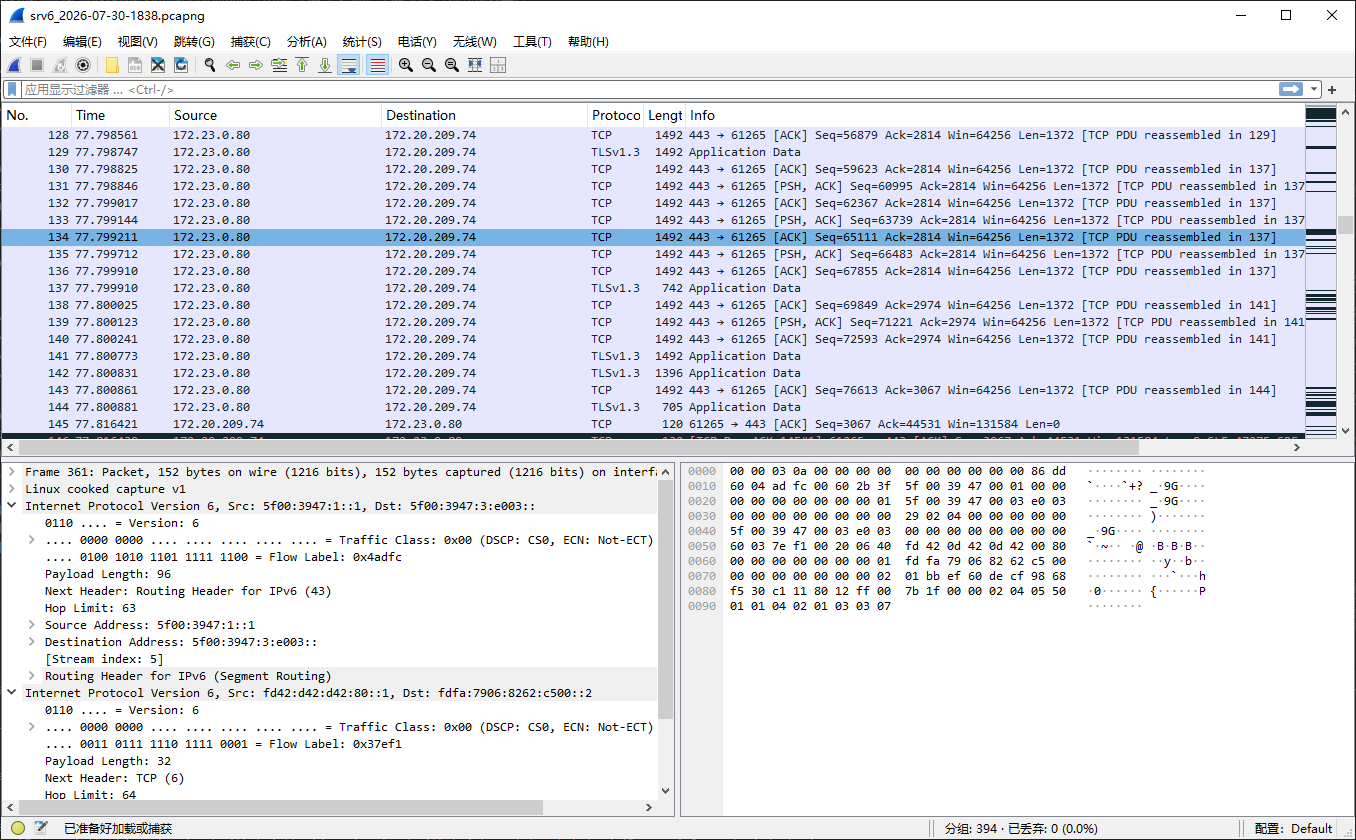
为了方便读者更直观地看到 SRv6 相关的抓包内容,配置 PCAP 过滤器:
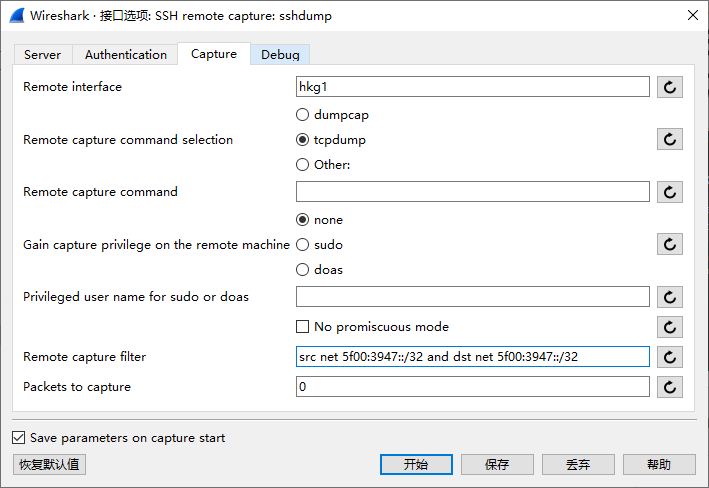
随后可以启动抓包。
3.2 Ping 网内地址
172.20.209.64 配置在 HKG1 节点上,它必然会经过 hkg1 链路。
PS C:\Users\haksr> ping 172.20.209.64

Pinging 172.20.209.64 with 32 bytes of data:
Reply from 172.20.209.64: bytes=32 time=22ms TTL=63
Reply from 172.20.209.64: bytes=32 time=24ms TTL=63
Reply from 172.20.209.64: bytes=32 time=24ms TTL=63
Reply from 172.20.209.64: bytes=32 time=24ms TTL=63

Ping statistics for 172.20.209.64:
    Packets: Sent = 4, Received = 4, Lost = 0 (0% loss),
Approximate round trip times in milli-seconds:
    Minimum = 22ms, Maximum = 24ms, Average = 23ms
3.3 ing 跨节点网外地址
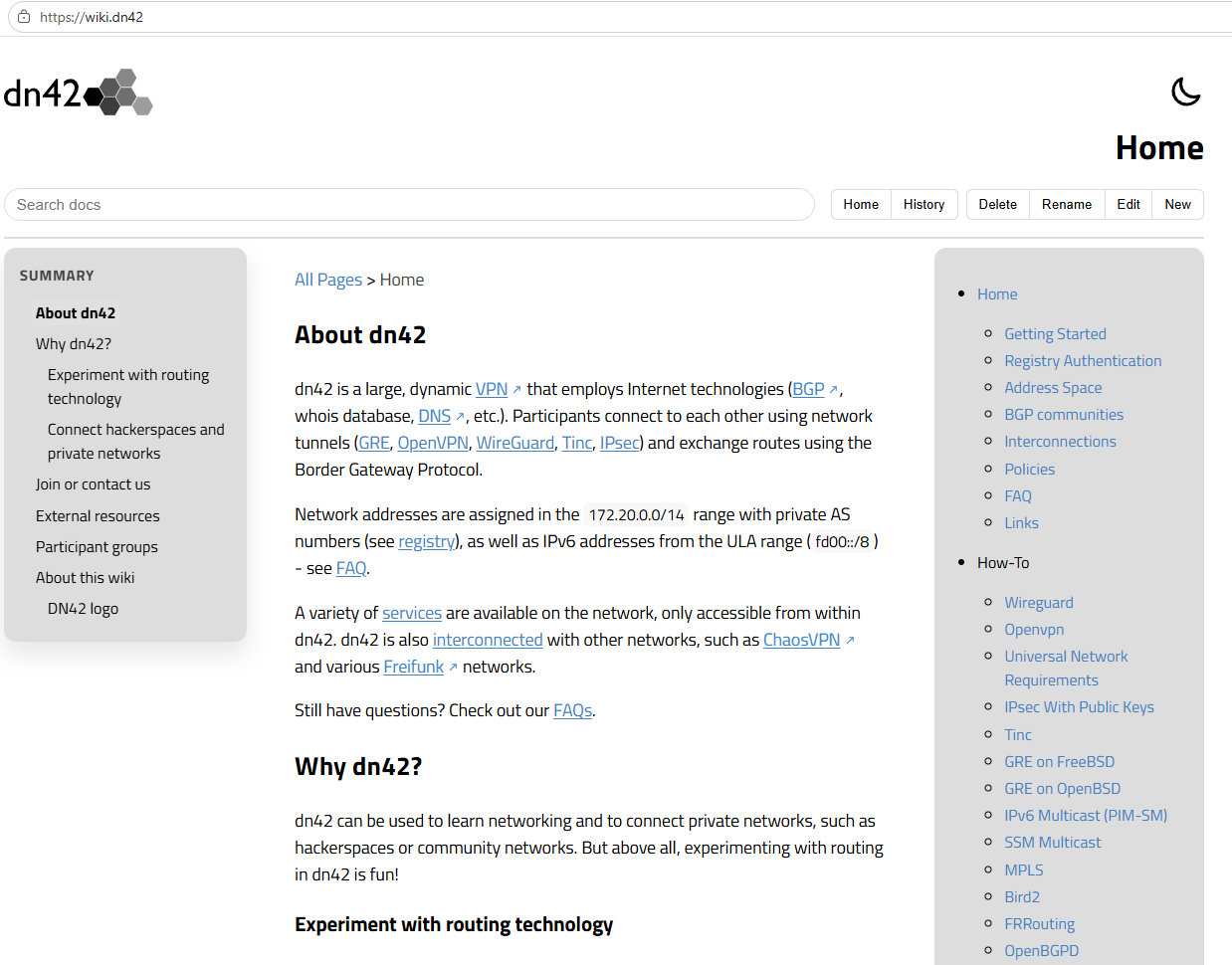
wiki.dn42 (172.23.0.80) 的流量也会经过 hkg1 链路:
Pinging 172.23.0.80 with 32 bytes of data:
Reply from 172.23.0.80: bytes=32 time=29ms TTL=63
Reply from 172.23.0.80: bytes=32 time=28ms TTL=63
Reply from 172.23.0.80: bytes=32 time=32ms TTL=63
Reply from 172.23.0.80: bytes=32 time=26ms TTL=63

Ping statistics for 172.23.0.80:
    Packets: Sent = 4, Received = 4, Lost = 0 (0% loss),
Approximate round trip times in milli-seconds:
    Minimum = 26ms, Maximum = 32ms, Average = 28ms
3.4 访问 wiki.dn42
3.5 抓包内容一览
4 已知限制
4.1 NAT
当流量的目的地址的路由带有 SRv6 封装时,流量不会触发 netfilter 的 SNAT 规则,而是直接封装成 SRv6 流量发送过去。
4.2 路由器 IPv6 地址无法访问
由于未知原因,IPv4 和 IPv6 的 SRv6 解包调用路径并不一样,IPv4 回程流量能够正常切换到目标 VRF 查表,IPv6 流量却不能。不过不影响转发流量,只影响源或者目的地址在路由器上的流量。