EoMPLS (Ethernet over MPLS) is a technology transports ethernet traffic over MPLS network.
Compared to transmit ethernet traffic directly within same layer 2 domain, it has these advantages:
- Easy to manage
- More complete QoS support
- Controllable forwarding path
And as compared to transmit ethernet traffic over IP, MPLS overcomes with high integration with current telecom network infrastructure (LDP, RSVP, BGP, etc.) and less overhead (IPv4 header takes at least 20 bytes, while MPLS only takes 4 bytes per label).
In telecom network, MPLS is more popular than IP in transport service.
Though EoMPLS takes advantages, but it’s not easy to reach with us, the regular Linux players for now: Linux doesn’t come with native MPLS pseudowire support, and community don’t care much about it either.
Luckly, the current Linux networking stack and tools is enough to support static MPLS pseudowire. Without any programming, just a existing MPLS network, and few commands.
I strongly recommend build this MPLS network with SR-MPLS, in SR-MPLS network, we can assign every loopback address a unique label across whole SR-MPLS domain. This will be a great help to our MPLS pseudowire service, as we don’t have signalling, we have to manually assign label.
Currently, frr is best option building MPLS network on Linux, it supports SR-MPLS.
For more about build SR-MPLS network with frr, please refer:
- https://docs.frrouting.org/en/stable-10.5/isisd.html#segment-routing
- https://docs.frrouting.org/en/stable-10.5/ospfd.html#segment-routing
- https://www.uni-koeln.de/~pbogusze/posts/FRRouting_IS-IS_Segment_Routing_tech_demo.html
- https://www.uni-koeln.de/~pbogusze/posts/FRRouting_SR_Segment_Routing_tech_demo.html
- And more……
Network Topology
    +-------------------+  +-------------------+
    |    SR Router 1    |  |    SR Router 1    |
    |   default netns   |  |   pw_inter netns  |
    |                   |  |                   |
    |            pw_in ====== pw_out           |
    |                   |  |                   |
    |              pw0 ====== pw0_ns           |
    |                   |  |                   |
    |      can1         |  |                   |
    +-------||----------+  +-------------------+
            ||
            ||
    +-------||----------+
    |                   |
    |  SR-MPLS Network  |
    |                   |
    +-------||----------+
            ||
            ||
    +-------||----------+  +-------------------+
    |      gz1          |  |                   |
    |                   |  |                   |
    |    SR Router 2    |  |    SR Router 2    |
    |   default netns   |  |   pw_inter netns  |
    |                   |  |                   |
    |            pw_in ====== pw_out           |
    |                   |  |                   |
    |              pw0 ====== pw0_ns           |
    +-------------------+  +-------------------+
Create Netns and Veth pairs
Execute commands on SR Router 1:
ip netns add pw_inter
ip link add pw0 type veth peer pw0_ns
ip link add pw_in type veth peer pw_out
ip link set pw0 up
ip link set pw_in up
ip link set pw0_ns netns pw_inter
ip link set pw_out netns pw_inter
Enter pw_inter and enable interfaces:
ip netns exec pw_inter bash
ip link set pw0_ns up
ip link set pw_out up
exit
Repeat those steps on SR Router 2.
Configure interface IP address
Execute command on SR Router 1:
ip addr add 192.168.96.1/24 dev pw0
Execute command on SR Router 2:
ip addr add 192.168.96.2/24 dev pw0
Configure TC rules within Netns
Execute command on both nodes:
ip netns exec pw_inter bash
ip link show pw0_ns
ip link show pw_out
tc qdisc add dev pw0_ns ingress
tc filter add dev pw0_ns ingress matchall \
    action mpls mac_push protocol mpls_uc label 200 \
    action mpls mac_push protocol mpls_uc label (peer loopback label here) \
    action vlan push_eth dst_mac (pw_out mac address here) src_mac (pw0_ns mac address here) \
    action mirred egress redirect dev pw_out
tc qdisc add dev pw_out ingress
tc filter add dev pw_out ingress protocol mpls_uc \
    flower mpls_label 200 mpls_bos 1 \
    action vlan pop_eth protocol teb \
    action mirred egress redirect dev pw0_ns
exit
Add MPLS route back to pw_inter
Execute command on both nodes:
ip -M route add 200 as 200 dev pw_in
Test
I do test on my SERNET-HET1, it’s SR Router 1 equivalent of this article:
root@SERNET-HET1:~# ping 192.168.96.2 -c 4
PING 192.168.96.2 (192.168.96.2) 56(84) bytes of data.
64 bytes from 192.168.96.2: icmp_seq=1 ttl=64 time=217 ms
64 bytes from 192.168.96.2: icmp_seq=2 ttl=64 time=214 ms
64 bytes from 192.168.96.2: icmp_seq=3 ttl=64 time=218 ms
64 bytes from 192.168.96.2: icmp_seq=4 ttl=64 time=213 ms

--- 192.168.96.2 ping statistics ---
4 packets transmitted, 4 received, 0% packet loss, time 3000ms
rtt min/avg/max/mdev = 212.652/215.414/217.973/2.166 ms
On another side:
root@SERNET-SJC1:~# ping 192.168.96.1 -c 4
PING 192.168.96.1 (192.168.96.1) 56(84) bytes of data.
64 bytes from 192.168.96.1: icmp_seq=1 ttl=64 time=213 ms
64 bytes from 192.168.96.1: icmp_seq=2 ttl=64 time=213 ms
64 bytes from 192.168.96.1: icmp_seq=3 ttl=64 time=214 ms
64 bytes from 192.168.96.1: icmp_seq=4 ttl=64 time=214 ms

--- 192.168.96.1 ping statistics ---
4 packets transmitted, 4 received, 0% packet loss, time 3004ms
rtt min/avg/max/mdev = 212.801/213.423/214.120/0.537 ms
root@SERNET-SJC1:~#
Packet capture on middle node:
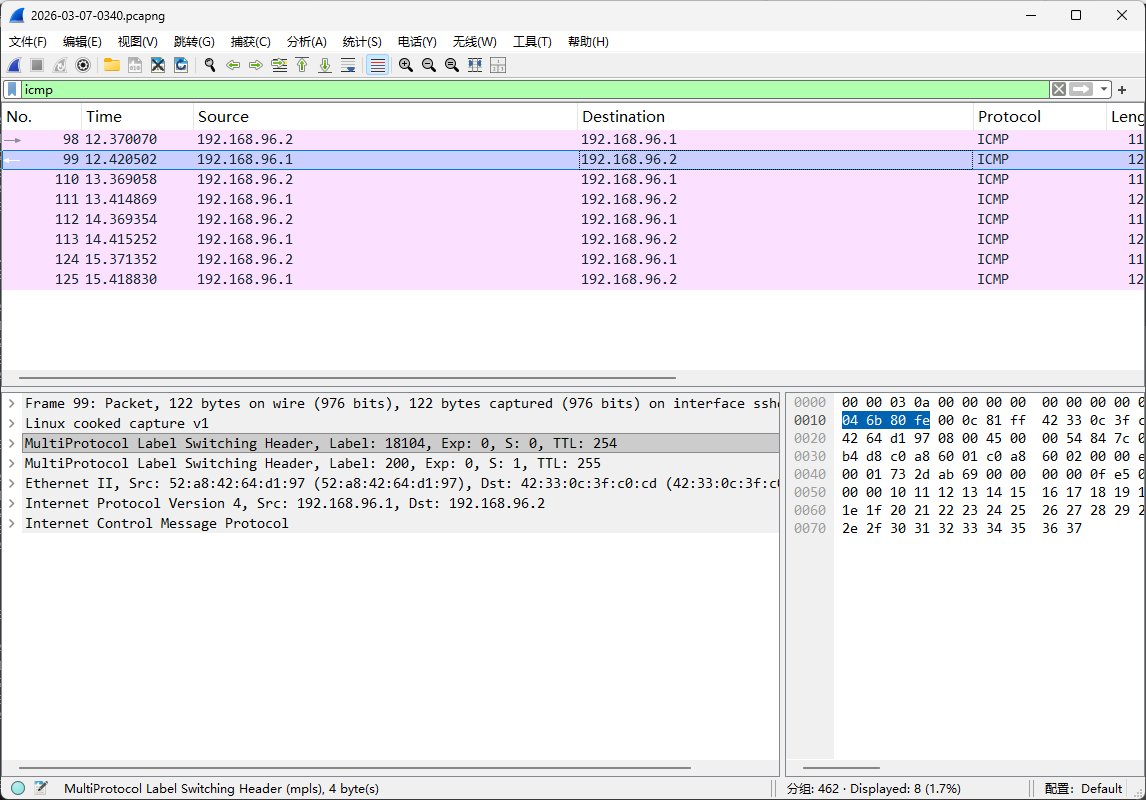
Capture file: 2026-03-07-0340.pcapng